If you've ever tried to send a bunch of photos or product images as a single file, you already know the frustration. You either end up sending ten separate attachments, compressing everything into a ZIP that nobody wants to open, or paying for some sketchy online tool that slaps a watermark on your file and asks for your email address.
That's exactly why we built this tool. A clean, fast, completely free image to PDF converter that works right in your browser — no sign up, no software to install, nothing to figure out.
What Can You Convert?
The tool supports JPG, PNG, WebP, BMP, and TIFF files. So whether you're working with photos from your phone, product images from a Shopify store, scanned documents, or design exports, it's all covered. You can upload a single image or a whole batch at once, mix formats in the same PDF, and each file can be up to 5MB.
The Features That Actually Matter
A lot of converters online do the bare minimum — you upload, you download, that's it. We wanted to build something more useful than that, so here's what you actually get:
Drag to reorder pages. Once your images are uploaded, they show up in a preview list. If the order isn't right, just drag them around until it is. Simple as that. The page numbers update as you move things so you always know exactly what the final PDF will look like before you generate it.
Rotate before converting. Got an image that came in sideways or upside down? Hit the rotate button and fix it in the preview. No need to go back to your photo editor just to flip something 90 degrees.
Custom background color. This one's particularly useful if you're working with PNG or WebP files that have transparent backgrounds — product images, logos, that kind of thing. Instead of getting an ugly black box where the transparency was, you can set any background color you want. White is the default, but you can pick anything.
Multiple page sizes. Choose between A4, Letter, and other standard sizes depending on whether you're printing or just sharing digitally.
Delete images from the list. Changed your mind about including one of the files? Just delete it from the preview without having to start the whole upload over again.
Your Files Never Leave Your Device
This is worth saying clearly because a lot of people don't realize how most online converters work. When you upload a file to most tools, it goes to their server, gets processed there, and — depending on the service — could sit on their infrastructure for hours, days, or longer.
With this tool, everything happens locally in your browser. The images are never sent anywhere. The PDF is generated on your machine and downloaded directly to it. There's no server involved. That means it's fast, it works offline once the page is loaded, and there are zero privacy concerns.
How to Use It:
It's pretty self-explanatory but here's the full flow:
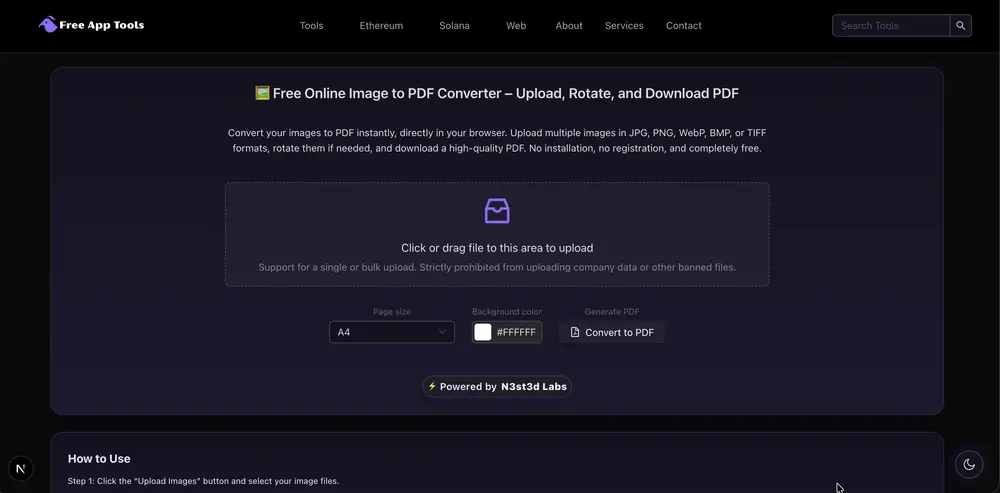
Upload your images by clicking the upload area or dragging files directly onto it. They'll appear in a preview list showing the image, filename, and file size.
Reorder them by dragging if needed. Rotate anything that's crooked. Delete anything you don't want included.
Pick your page size and background color from the controls below the preview.
Hit Convert to PDF and the file downloads automatically. Open it and you'll see each image on its own page, centered, with proper letterboxing so nothing gets cropped or stretched.
The whole process takes about thirty seconds once your files are ready.
A Few Things Worth Knowing
Each image gets its own page in the PDF. There's no option to put multiple images on a single page right now — every file you upload becomes one full page.
The tool handles transparent backgrounds by compositing them against whatever background color you've selected before embedding the image into the PDF. This is important because the PDF format itself doesn't support transparency the same way PNG does, so this step prevents the black box issue you might have seen in other converters.
File size limit is 5MB per image. For most use cases that's plenty, but if you're working with very large RAW files or uncompressed TIFFs you may need to resize first.
Why Free?
We run a collection of free browser-based tools at FreeAppTools.co. The goal is simple — build useful tools that people actually need without putting them behind paywalls or forcing sign ups. We think software that helps people do basic tasks should just be free.
If you find the tool useful, sharing it with someone who needs it is the best thing you can do. It helps us keep the lights on and keep building.
Try It Now : https://freeapptools.co/tools/image-to-pdf
Head over to the Image to PDF converter, drop in your images, and have your PDF in under a minute. No account, no watermarks, no nonsense.
And if something doesn't work the way you expect or you have a feature idea, let us know. This tool gets better because people tell us what's missing.
Watch Tutorial:
More Tools: https://freeapptools.co
Contact Us: https://n3st3dlabs.org/contact-us
Email: info@n3st3dlabs.org


