
Next.js SEO: Mastering Dynamic Metadata & Structured JSON-LD
In the ever-evolving landscape of web development, a beautiful, performant website is only half the battle. To truly shine, your site needs to be discovered by search engines, and that's where effective Search Engine Optimization (SEO) comes into play. For Next.js developers, the framework offers powerful, built-in capabilities to handle SEO essentials like metadata and structured data (JSON-LD), helping your pages rank higher and display richer results.
This guide will walk you through integrating dynamic metadata and JSON-LD in your Next.js application, providing concrete examples and best practices to supercharge your SEO.
Why Metadata and JSON-LD Matter for SEO
Before diving into the "how," let's quickly reiterate the "why":
- Metadata (<meta> tags): These are snippets of text that describe a page's content, but aren't visible on the page itself. They live in the <head> section of your HTML. Search engines use them to understand what your page is about, which helps with ranking. Key metadata includes:
- Title: The most critical SEO element. It appears in browser tabs and as the main headline in search results.
- Meta Description: A concise summary of the page content. It often appears under the title in search results, enticing users to click.
- Open Graph (OG) Tags: Used by social media platforms (Facebook, LinkedIn, X/Twitter) to display rich previews when your page is shared.
- Canonical URL: Tells search engines which version of a page is the "master" copy, preventing duplicate content issues.
- Robots: Instructs search engine crawlers whether to index a page or follow its links.
- JSON-LD (Structured Data): This is a specific format of structured data that helps search engines understand the context and relationships of information on your page. It's often invisible to users but immensely powerful for crawlers. When implemented correctly, JSON-LD can qualify your content for rich snippets (e.g., star ratings, product prices, event dates, FAQ accordions directly in search results), dramatically increasing click-through rates.
Together, metadata tells search engines "what this page is," and JSON-LD tells them "what this content means."
Integrating Metadata in Next.js (App Router)
Next.js (especially with the App Router) simplifies metadata management with a powerful generateMetadata API. This function runs on the server, ensuring your metadata is present in the initial HTML response – crucial for SEO.
The generateMetadata Function
You can export an async function generateMetadata() from any layout.js or page.js file.
Key Features:
- Server-Side Execution: Ensures metadata is available for crawlers.
- Dynamic Data Fetching: You can fetch data (e.g., from a CMS or database) to populate your metadata.
- params and searchParams Access: Allows dynamic metadata based on URL parameters.
- Prioritization: Metadata in a page.js overrides metadata in its parent layout.js.
Example: app/blog/[slug]/page.js (for a dynamic blog post)
// app/blog/[slug]/page.js
import { getBlogPostBySlug } from '@/lib/api'; // Your data fetching utility

export async function generateMetadata({ params }) {
  const post = await getBlogPostBySlug(params.slug);

  if (!post) {
    return {
      title: 'Blog Post Not Found | MyAwesomeBlog',
      description: 'The requested blog post could not be found.',
      robots: {
        index: false,
        follow: true,
      },
      alternates: {
        canonical: `https://yourwebsite.com/404`, // Or a generic blog page
      },
    };
  }

  const title = `${post.title} | MyAwesomeBlog`;
  const description = post.excerpt || `Read "${post.title}" and stay updated with the latest insights.`;
  const imageUrl = post.coverImage || 'https://yourwebsite.com/default-og-image.jpg';
  const fullUrl = `https://yourwebsite.com/blog/${params.slug}`;

  return {
    title,
    description,
    keywords: post.tags ? post.tags.join(', ') : 'blog, technology, nextjs, seo',
    openGraph: {
      title,
      description,
      url: fullUrl,
      type: 'article', // Use 'article' for blog posts
      images: [
        {
          url: imageUrl,
          width: 1200,
          height: 630,
          alt: post.title,
        },
      ],
      article: {
        publishedTime: post.publishedDate,
        modifiedTime: post.updatedDate || post.publishedDate,
        authors: [post.author.name],
        tags: post.tags,
      },
    },
    twitter: {
      card: 'summary_large_image',
      site: '@YourTwitterHandle', // Your Twitter handle
      creator: `@${post.author.twitterHandle || 'YourTwitterHandle'}`,
      title,
      description,
      images: [imageUrl],
    },
    alternates: {
      canonical: fullUrl,
    },
    // Robots directives for SEO control
    robots: {
      index: true,
      follow: true,
      nocache: false,
      googleBot: {
        index: true,
        follow: false,
        noimageindex: false,
        'max-video-preview': -1,
        'max-image-preview': 'large',
        'max-snippet': -1,
      },
    },
    // Other useful tags
    authors: [{ name: post.author.name, url: `https://yourwebsite.com/author/${post.author.slug}` }],
    creator: post.author.name,
    publisher: 'MyAwesomeBlog',
  };
}

export default function BlogPostPage({ params }) {
  // Your page content
}
Detailed Metadata Fields Explained:
- title (string): The most important. Max 50-60 characters.
- Example: "My Awesome Blog Post Title | MySite"
- description (string): Concise summary. Max 150-160 characters.
- Example: "A detailed guide on Next.js SEO, covering metadata, JSON-LD, and best practices to boost your search rankings."
- keywords (string | string[]): Comma-separated relevant terms. Less impactful than before, but still good to include for clarity.
- Example: ['nextjs', 'seo', 'metadata', 'json-ld', 'web development']
- openGraph (object): For social media sharing previews.
- title, description: Overrides standard meta tags for social.
- url: Full canonical URL of the page.
- type: e.g., 'website', 'article', 'product'. Crucial for social.
- images (array): URL of the image to display.
- url: Absolute URL.
- width, height: Recommended 1200x630px for optimal display.
- alt: Image description for accessibility and SEO.
- article (object): Specific for type: 'article'.
- publishedTime, modifiedTime: ISO 8601 format.
- authors, tags: Array of authors/tags.
- twitter (object): Specific for Twitter Cards.
- card: e.g., 'summary_large_image', 'summary'.
- site, creator: Your Twitter handle and the author's handle.
- title, description, images: Similar to Open Graph.
- alternates (object):
- canonical: The preferred version of a page's URL. Crucial for duplicate content.
Example: { canonical: 'https://yourwebsite.com/blog/my-awesome-post' }
- media: For responsive content (e.g., { media: '(max-width: 480px)', href: 'https://m.example.com/page' }).
- languages: For internationalization (e.g., { 'en-US': 'https://example.com/en-US/page', 'es-ES': 'https://example.com/es-ES/page' }).
- robots (object): Controls crawler behavior.
- index (boolean): true to index, false for noindex.
- follow (boolean): true to follow links, false for nofollow.
- nocache, noarchive: Other directives.
- googleBot: Specific directives for Googlebot.
- authors, creator, publisher (string | array): For authorship and attribution.
Global Metadata (in app/layout.js)
For site-wide defaults, define generateMetadata in your root app/layout.js. Page-specific metadata will automatically override these defaults.
// app/layout.js
export const metadata = { // Use 'const metadata' for static global metadata
  title: {
    default: 'My Awesome Blog',
    template: '%s | My Awesome Blog', // Appends site title to page titles
  },
  description: 'The official blog for all things tech, coding, and web development.',
  siteName: 'My Awesome Blog',
  openGraph: {
    title: 'My Awesome Blog',
    description: 'The official blog for all things tech, coding, and web development.',
    url: 'https://yourwebsite.com',
    siteName: 'My Awesome Blog',
    images: [
      {
        url: 'https://yourwebsite.com/og-image.jpg',
        width: 1200,
        height: 630,
        alt: 'My Awesome Blog Logo',
      },
    ],
    locale: 'en_US',
    type: 'website',
  },
  twitter: {
    card: 'summary_large_image',
    title: 'My Awesome Blog',
    description: 'The official blog for all things tech, coding, and web development.',
    creator: '@YourTwitterHandle',
    images: ['https://yourwebsite.com/og-image.jpg'],
  },
  icons: {
    icon: '/favicon.ico',
    shortcut: '/favicon-16x16.png',
    apple: '/apple-touch-icon.png',
  },
  manifest: '/site.webmanifest',
};

export default function RootLayout({ children }) {
  return (
    <html lang="en">
      <body>{children}</body>
    </html>
  );
}
Integrating JSON-LD in Next.js
JSON-LD is embedded directly into the HTML within a <script type="application/ld+json"> tag. In Next.js, the most robust way to add this is directly within your page or layout components.
<script type="application/ld+json">
  {
    "@context": "https://schema.org",
    "@type": "Article",
    "headline": "Next.js SEO: Master Metadata & JSON-LD",
    "image": [
      "https://yourwebsite.com/blog/seo-guide/main-image.jpg",
      "https://yourwebsite.com/blog/seo-guide/image1.jpg"
    ],
    "datePublished": "2024-01-01T09:00:00+08:00",
    "dateModified": "2024-01-05T09:00:00+08:00",
    "author": {
      "@type": "Person",
      "name": "Your Name",
      "url": "https://yourwebsite.com/author/your-name"
    },
    "publisher": {
      "@type": "Organization",
      "name": "MyAwesomeBlog",
      "logo": {
        "@type": "ImageObject",
        "url": "https://yourwebsite.com/logo.png"
      }
    },
    "description": "A detailed guide on integrating dynamic metadata and structured JSON-LD in Next.js for powerful SEO."
  }
</script>
Implementing JSON-LD in a Next.js Page
You'll create the JSON-LD object dynamically, convert it to a string, and then inject it using dangerouslySetInnerHTML.
Example: app/blog/[slug]/page.js (continued from above)
// ... (inside your BlogPostPage component or just before the return statement)

export default function BlogPostPage({ params }) {
  const post = /* fetch post data again, or pass from layout/server component */

  // Define your JSON-LD object dynamically
  const jsonLd = {
    "@context": "https://schema.org",
    "@type": "Article", // Or BlogPosting
    "headline": post.title,
    "image": post.images.length > 0 ? post.images : ['https://yourwebsite.com/default-article.jpg'],
    "datePublished": post.publishedDate,
    "dateModified": post.updatedDate || post.publishedDate,
    "author": {
      "@type": "Person",
      "name": post.author.name,
      "url": `https://yourwebsite.com/author/${post.author.slug}`
    },
    "publisher": {
      "@type": "Organization",
      "name": "MyAwesomeBlog",
      "logo": {
        "@type": "ImageObject",
        "url": "https://yourwebsite.com/logo.png"
      }
    },
    "description": post.excerpt,
    "mainEntityOfPage": {
      "@type": "WebPage",
      "@id": `https://yourwebsite.com/blog/${params.slug}`
    }
  };

  return (
    <>
      <script
        type="application/ld+json"
        dangerouslySetInnerHTML={{ __html: JSON.stringify(jsonLd) }}
      />
      {/* Your actual blog post content */}
      <article>
        <h1>{post.title}</h1>
        {/* ... rest of your article ... */}
      </article>
    </>
  );
}
Common JSON-LD Schema Types:
The @type property is crucial for telling search engines what kind of content you're describing.
- Article / BlogPosting: For blog posts and articles.
- WebPage / CollectionPage: For general pages or category/tag archives.
- Organization / Person: For defining your entity.
- Product: For e-commerce product pages (includes price, availability, reviews).
- FAQPage: For pages with frequently asked questions (can generate rich accordions).
- Recipe: For recipe pages (includes ingredients, cooking time, ratings).
- Event: For event listings (includes dates, location, tickets).
- LocalBusiness: For businesses with physical locations.
- BreadcrumbList: For displaying breadcrumb navigation paths in search results.
Example: FAQPage JSON-LD for rich snippets
const faqLd = {
  "@context": "https://schema.org",
  "@type": "FAQPage",
  "mainEntity": [
    {
      "@type": "Question",
      "name": "What is Next.js?",
      "acceptedAnswer": {
        "@type": "Answer",
        "text": "Next.js is a React framework for building full-stack web applications. It enables React-based web applications with server-side rendering and static site generation capabilities."
      }
    },
    {
      "@type": "Question",
      "name": "How does Next.js help with SEO?",
      "acceptedAnswer": {
        "@type": "Answer",
        "text": "Next.js boosts SEO through server-side rendering (SSR) and static site generation (SSG), ensuring content is available for crawlers. It also has built-in metadata APIs and supports structured data."
      }
    }
  ]
};

// Render in your component:
return (
  <>
    <script
      type="application/ld+json"
      dangerouslySetInnerHTML={{ __html: JSON.stringify(faqLd) }}
    />
    {/* Your FAQ content rendered visually */}
    <h2>What is Next.js?</h2>
    <p>Next.js is a React framework...</p>
    <h2>How does Next.js help with SEO?</h2>
    <p>Next.js boosts SEO...</p>
  </>
);
Best Practices for Next.js SEO with Metadata & JSON-LD
- Consistency is Key: Ensure your metadata (title, description, image) in generateMetadata matches your JSON-LD and the actual on-page content. Inconsistencies can confuse search engines.
- Dynamic for Everything: Leverage params and fetched data in generateMetadata and your JSON-LD generation for all dynamic pages (blog posts, products, categories).
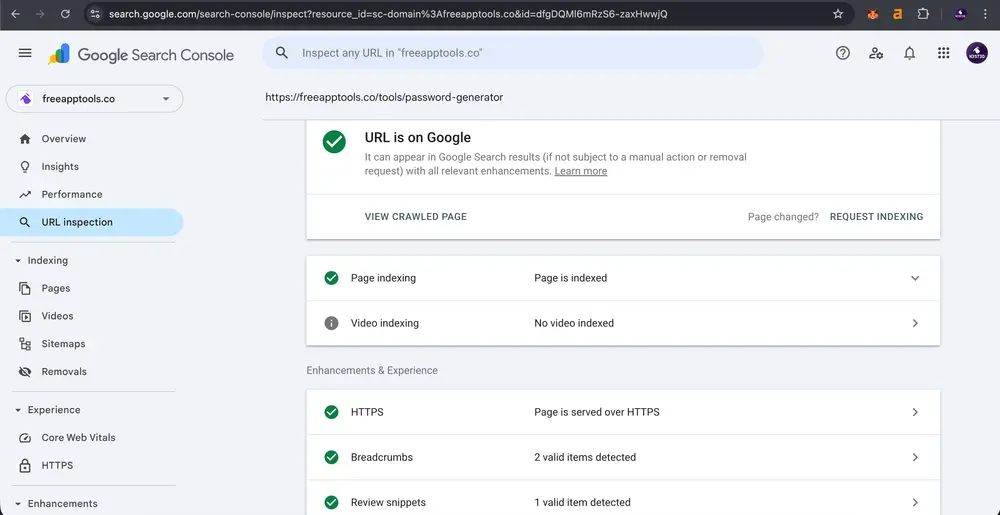
- Validate Your JSON-LD: Always use Google's Rich Results Test to check if your structured data is correctly implemented and eligible for rich snippets.
- Canonical URLs: Explicitly set canonical URLs using alternates.canonical to prevent duplicate content issues, especially with pagination, filters, or URL parameters.
- Descriptive Alt Text: Ensure all images, especially those in your Open Graph and JSON-LD, have descriptive alt attributes. This aids accessibility and image SEO.
- Performance: While metadata and JSON-LD are critical for SEO, remember that page load speed is also a ranking factor. Next.js excels here with its optimized builds.
- Sitemap & Robots.txt: Complement your on-page SEO by having a well-structured sitemap.xml that lists all pages you want indexed, and a robots.txt file to block unwanted crawling (e.g., admin pages).
- Human-Readable First: Always write your titles and descriptions for human readers first. While keywords are important, clickability and relevance are paramount.
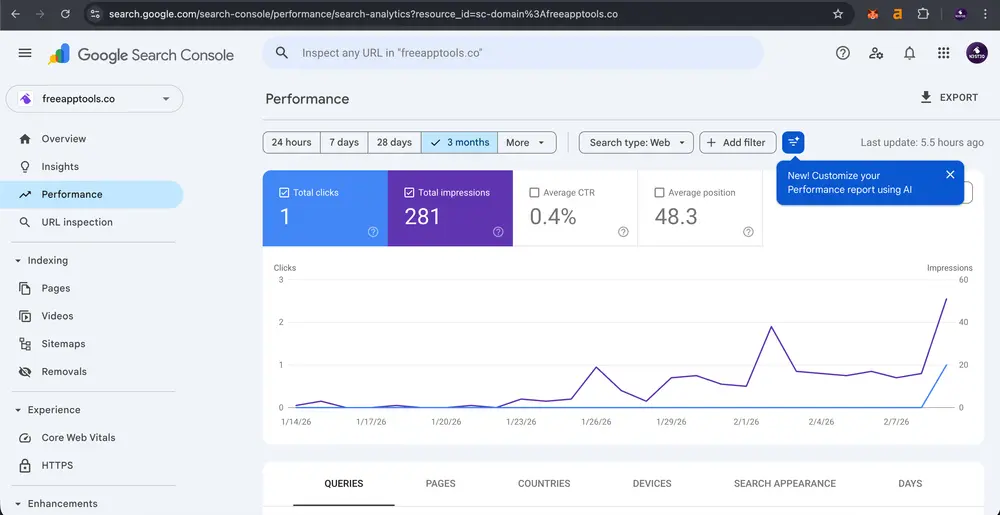
- Monitor with Search Console: Regularly check Google Search Console for any errors in your structured data or metadata, and to track your performance.
Conclusion
Integrating dynamic metadata and structured JSON-LD into your Next.js application isn't just an option; it's a necessity for robust SEO in the modern web. By harnessing Next.js's powerful generateMetadata API and strategically embedding JSON-LD, you can ensure that your content is not only seen by search engines but also understood, leading to better rankings, richer search results, and ultimately, more organic traffic. Start implementing these strategies today and watch your Next.js site climb to the top of the search results.


