In the fast-paced world of Solana development, a single misplaced zero can be the difference between a successful transaction and a failed smart contract. Whether you are building a decentralized exchange, minting an NFT collection, or simply trying to understand your wallet balance, mastering the math between SOL and Lamports is a fundamental skill.
Today, we’re diving deep into how Solana handles units, why "BigInt" safety matters, and how you can use the FreeAppTools Solana Unit Converter to streamline your workflow.
🟣 What are SOL and Lamports?Before we jump into the technical tools, let's establish the basics. Just like the US Dollar is divided into cents or Bitcoin is divided into Satoshis, Solana has its own hierarchy.
The Native Unit: SOL
SOL is the primary utility token of the Solana ecosystem. It is used for:
Transaction Fees: Paying for the compute power of the network.
Staking: Securing the network and earning rewards.
Rent: Paying for storage space on the blockchain.
The Fractional Unit: Lamport
A Lamport is the smallest possible unit of SOL. It is named after Leslie Lamport, a foundational computer scientist whose work on distributed systems paved the way for modern blockchains.
The relationship is simple but mathematically significant:
$$1 \text{ SOL} = 1,000,000,000 \text{ Lamports} (10^9)$$
Why do we use Lamports?Computers, especially those running blockchain protocols, struggle with floating-point numbers (decimals). Decimals like 0.000000001 can lead to rounding errors in high-stakes financial environments. By using Lamports (whole integers), the Solana network ensures that every transaction is calculated with absolute precision.
🛠️ The Challenge for New DevelopersIf you are a new developer using libraries like @solana/web3.js, you will quickly notice that the network doesn't speak "SOL." It speaks "Lamports."If you want to send 0.5 SOL to a friend, your code needs to look like this:
const transaction = new Transaction().add(
SystemProgram.transfer({
fromPubkey: sender,
toPubkey: receiver,
lamports: 500000000, // 0.5 * 10^9
})
);
The Problem: Manually calculating these values in your head or a standard calculator is risky. It is incredibly easy to miss a zero or add one too many, leading to "Insufficient Funds" errors or, worse, sending the wrong amount.
🚀 Introducing the FreeAppTools Solana Converter
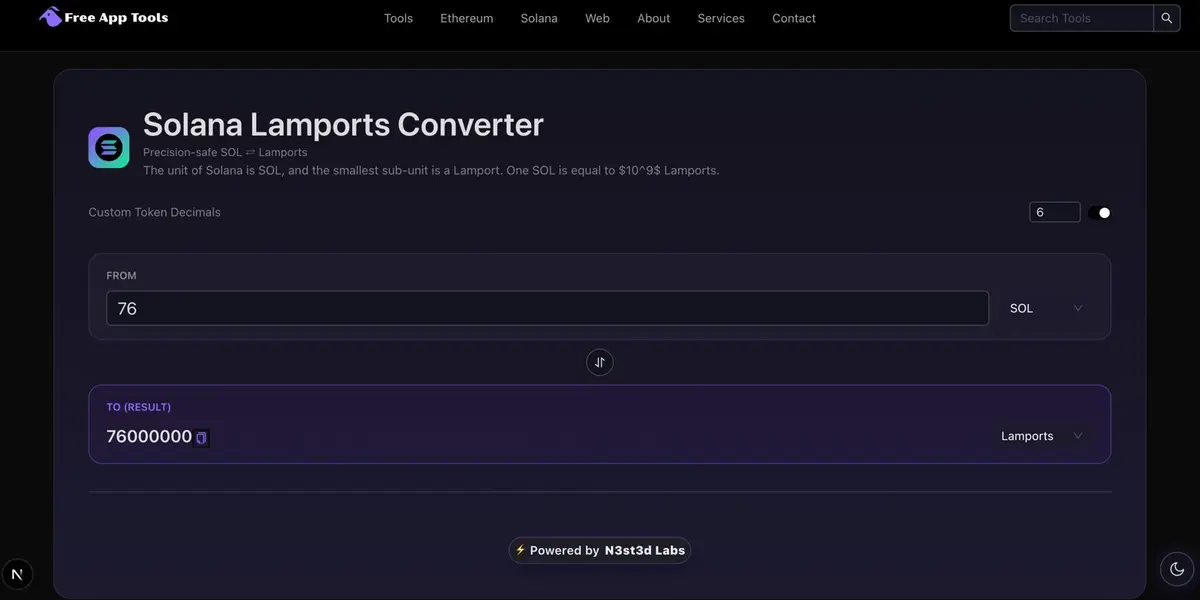
We built the Solana Unit Converter to solve this exact friction point. It is a lightweight, browser-based utility designed specifically for the Solana ecosystem.
Key Features
1. Instant Two-Way ConversionYou don't need to refresh the page or click "calculate." As you type in the SOL field, the Lamport field updates in real-time. This is perfect for double-checking your code's logic during a debugging session.
2. BigInt-Safe LogicStandard JavaScript numbers fail when they get too large. Since Lamports can reach massive values, our tool uses BigInt logic. This ensures that even if you are calculating millions of SOL, the conversion remains mathematically perfect down to the last digit.
3. Custom Decimal Support (The SPL Secret)
While SOL uses 9 decimals, not every token on Solana does.
USDC/USDT: 6 Decimals
Certain Meme Coins: 0 to 9 Decimals
Our tool allows you to toggle Custom Decimals.
If you are working with a 6-decimal stablecoin, simply change the setting, and the tool adjusts its math to $10^6$ instead of $10^9$.
4. One-Click Copy
When you are coding, you don't want to manually re-type a 12-digit number.
We’ve included a copy-to-clipboard button next to every result to make your development cycle faster.
💡 How to Use the Tool (Step-by-Step)
Select Your Direction: Use the Swap button to choose if you are converting from SOL or from Lamports.
Input Your Value: Enter the amount. You’ll notice the "TO (RESULT)" field populates instantly.
Adjust Decimals (Optional): If you are working with a specific token like USDC, toggle the custom decimals and set it to 6.
Copy and Paste: Hit the copy icon and paste the value directly into your terminal, frontend code, or wallet interface.
🧠 Common Use Cases
Debugging RPC Responses
When you query a wallet balance via an RPC call (like getBalance), the result is returned in Lamports. Use this tool to quickly see how much SOL that actually represents.
Calculating Rent-Exemption
To make an account "rent-exempt" on Solana, you must deposit a specific amount of SOL. The CLI usually gives this number in SOL, but your program might need it in Lamports.
Building dApp Frontends
When building a UI for users, you want them to type in SOL (because it’s human-readable), but your backend needs to send lamports. Use our converter to verify your frontend's conversion logic.
🔐 Privacy and Performance
In Web3, privacy is paramount. Many online converters track your inputs or require account sign-ups. The FreeAppTools Solana Converter:
Runs entirely in your browser. No data is sent to a server.
Is ad-free and lightweight, ensuring it loads instantly even on slow connections.
Is Mobile-Responsive, so you can use it inside your Phantom or Solflare mobile browser.
🏁 Conclusion
Solana is built for speed and scale, and your development tools should be too. By understanding the relationship between SOL and Lamports and using a dedicated converter, you eliminate a major source of bugs and stress.
Ready to simplify your Solana workflow?


